Qubit vs ChatGPT
ChatGPT can analyze files, build dashboards, and automate tasks. Qubit adds the warehouse, source sync, shared metrics, and data permissions your team needs for ongoing reporting.
- 140+ integrations
- Built-in data warehouse
- Recurring workflows
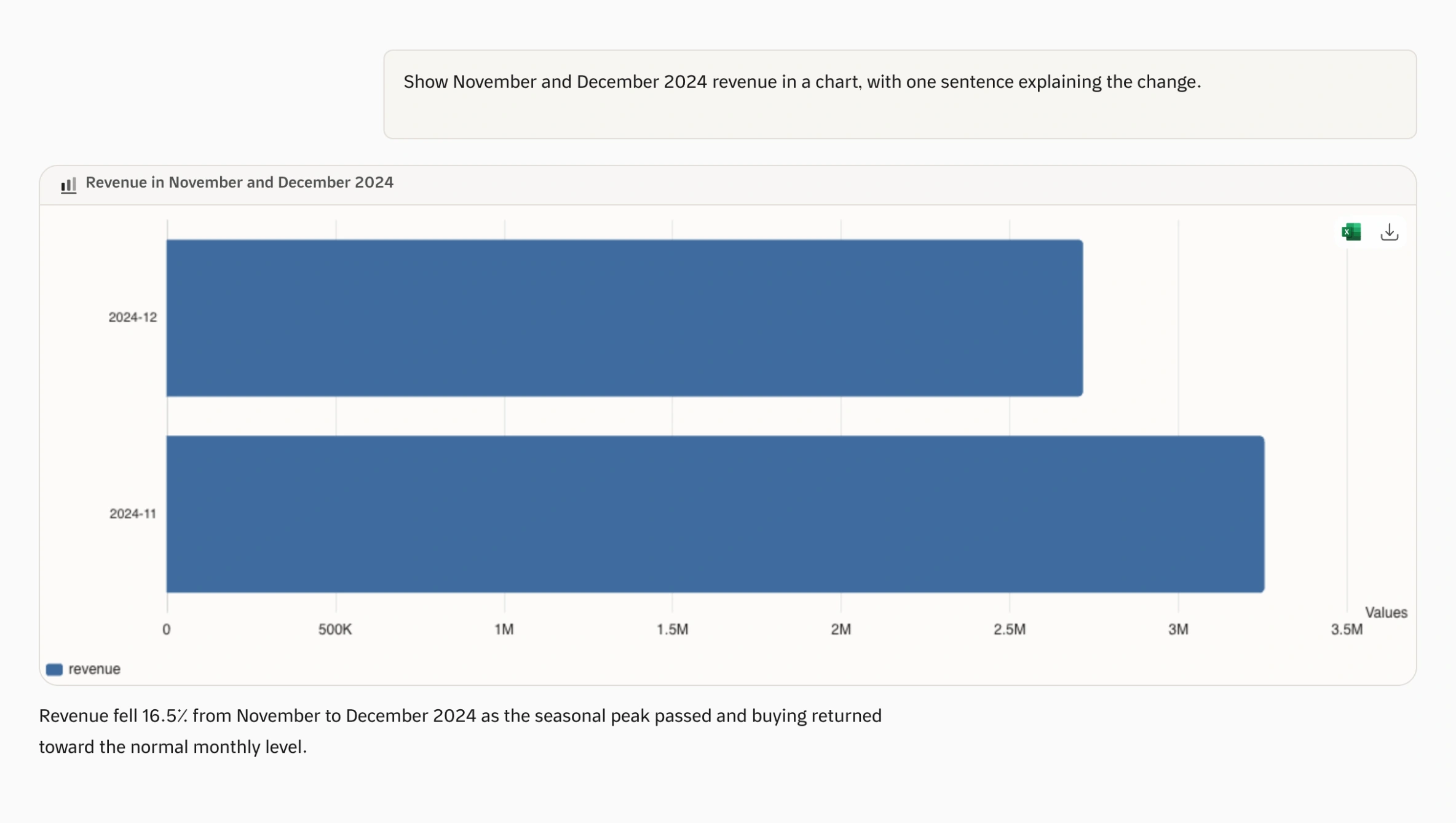
Build reporting your team can repeat every week.
A sales file can answer today’s question. Next week brings new orders, refunds, and costs from different systems. ChatGPT can help analyze them. Qubit collects that data in a warehouse we run, with shared metrics and scheduled reports.
Connect the records behind the answer
ChatGPTApps and uploaded files give ChatGPT data to work with. On their own, they do not create a SQL warehouse that combines your company’s sales, refunds, and costs.
With QubitQubit stores data synced from supported sources and makes it available for analysis in one workspace.
Make the calculation a shared business rule
ChatGPTInstructions and connected tools can carry your definitions. Someone still has to organize and update them, and apply source permissions across the reporting setup.
With QubitKeep metric definitions, data relationships, and access settings in Qubit next to the reports that use them.
Count the system you build around it
ChatGPTChatGPT can build dashboards and automate work. If you assemble a data platform around it, budget for storage, integrations, usage, and the person who maintains it.
With QubitQubit includes the warehouse, analysis, dashboards, and scheduled tasks, and we host and run all of it.
Connecting sources, defining metrics, and setting permissions are part of setup in Qubit as well. Advanced access controls and usage limits depend on your plan.
Compare at a glance
- Available
- Needs setup or a paid upgrade
- Not built in
| What to compare |  Decision intelligence Decision intelligence |  ChatGPTEnterprise AI assistant ChatGPTEnterprise AI assistant |
|---|---|---|
| What the product covers | Storage, analysis, and workflows togetherChat, dashboards, monitoring, reports, and scheduled workflows on the same data. | Requires setupAI assistance and agents for analysis, research, and work across connected tools. |
| Your team’s workspace | Built for business teamsAsk questions, build dashboards, schedule reviews. | AvailableAI workspace and agents across many business functions |
| Analysis without writing code | Ask business questions without writing SQLOnce sources, metrics, and access are configured, business teams can ask questions and follow up in plain language. | AvailableEveryday chat needs no coding. Connecting an assistant to a governed warehouse and a repeatable reporting process adds integration and administration work. |
| Business context | Shared definitionsMetric definitions and data relationships that span all your sources. | Requires setupFiles and connected tools, with administrative controls |
| Built-in data warehouse | Qubit can be your data warehouseSync supported sources into Qubit’s data store, or query supported databases directly. | Not built inWorks with files and connected apps; warehouse access is supplied through apps or tools. |
| Source protection | Read-only analysis queriesAnalysis queries are checked before execution and blocked if they modify data. This also applies to administrators. | Requires setupApps may take actions; workspace policies control which tools and actions are allowed. |
| Who can see your data | Control access down to rowsHigher plan requiredConfigure access to connections and datasets, with row filters applied to analysis queries. | Requires setupWorkspace app controls and connected-source permissions, with options that vary by plan. |
| Audit & traceability | Review activity and report sourcesWorkspace activity logs, plus the SQL and data sources behind each generated report. | Higher plan requiredCompliance API provides workspace logs and metadata on eligible plans. |
| Setup & maintenance | Fewer services to assembleData sync, storage, analysis, and workflows in one platform that we host and run. | Make the calculation a shared business ruleInstructions and connected tools can carry your definitions. Someone still has to organize and update them, and apply source permissions across the reporting setup. |
| Costs beyond the subscription | Storage and analysis in your planEach plan sets limits for users, storage, and usage. Your source systems and any external services you choose are billed separately. | Count the system you build around itChatGPT can build dashboards and automate work. If you assemble a data platform around it, budget for storage, integrations, usage, and the person who maintains it. |
| Published pricing (USD) | From $9/month for one userTeams from $99/month including 2 users, plus $15 per extra user up to the plan limit. Advanced access controls require a higher plan. See plans for full limits. | PricingBusiness Standard: $20/seat/month billed annually, or $25 billed monthly. Enterprise pricing depends on your agreement. |
Synced data is stored in Qubit. Advanced access controls, feature availability, and usage limits depend on your plan and setup.
Source: ChatGPT documentationPrices checked 27 September 2026. Plans, included features, and taxes can vary. See ChatGPT pricing and Qubit plans.
Comparison references
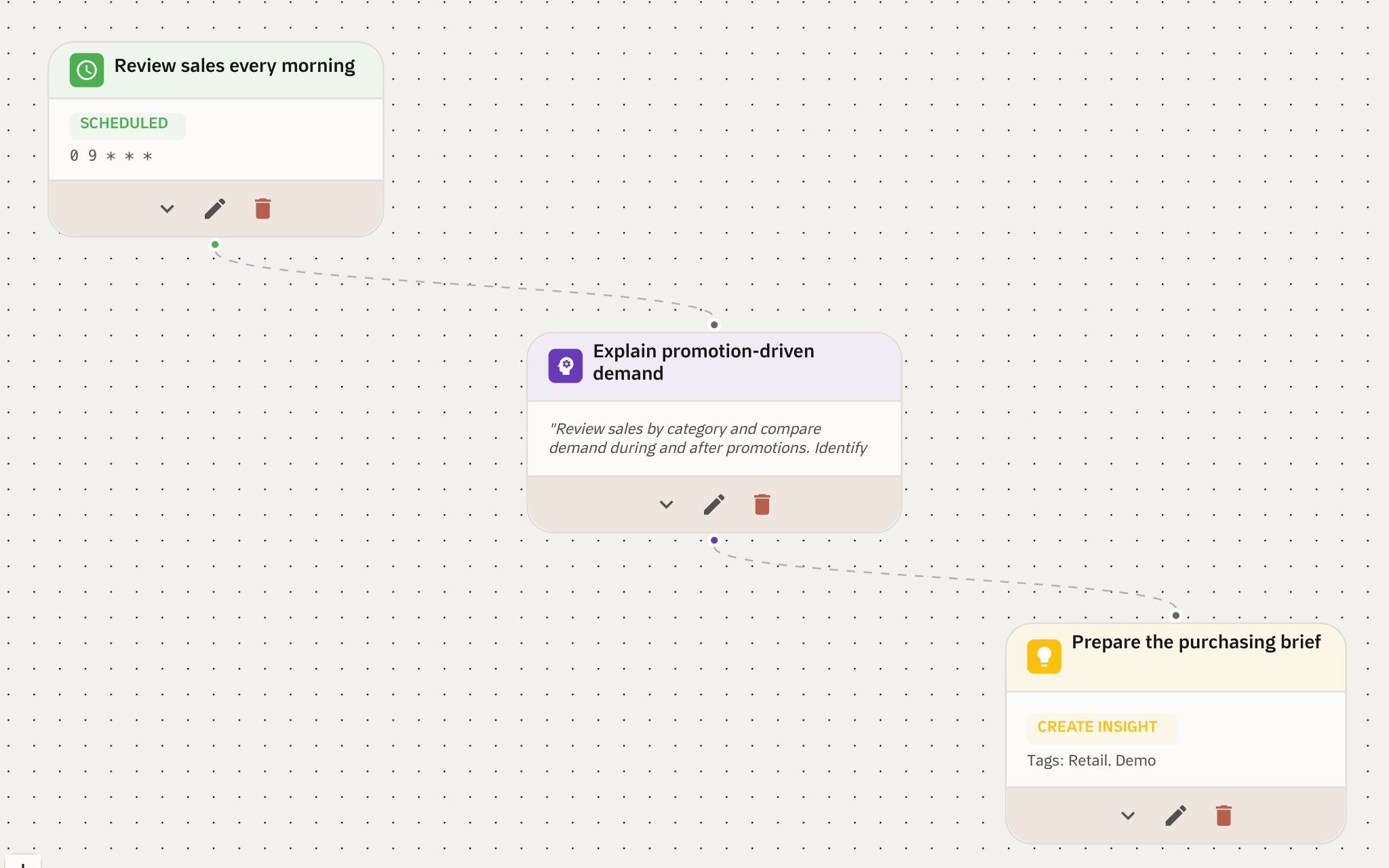
Your weekly analysis, already scheduled.
Turn a question your team asks every week into a scheduled review. Set when it runs, add the analysis step, and choose the output, such as a purchasing summary.
- Schedule the review your team repeats every week.
- Get the result as a report or summary the team can act on.
What a Qubit plan includes
- Everyday analysis
- Data chat, dashboards, shared metric definitions, scheduled workflows, and reports. Connection counts and usage limits depend on your plan.
- Automatic insights
- Qubit flags notable changes in your data, so you know where to look next.
- Embed, customize, and control
- Dashboard and agent embedding, your branding, custom and REST connectors, data permissions, row filters, member access review, and dedicated support.
See Qubit answer a question you already ask.
Connect a source and ask a question your team answers every week. See how Qubit handles the analysis, monitoring, and scheduled workflows.